🛡 Firewall & WAF
WordPress Application Firewall with security hardening, HTTP security headers, and configurable rate limiting. Block attacks at the application layer before they reach your site.
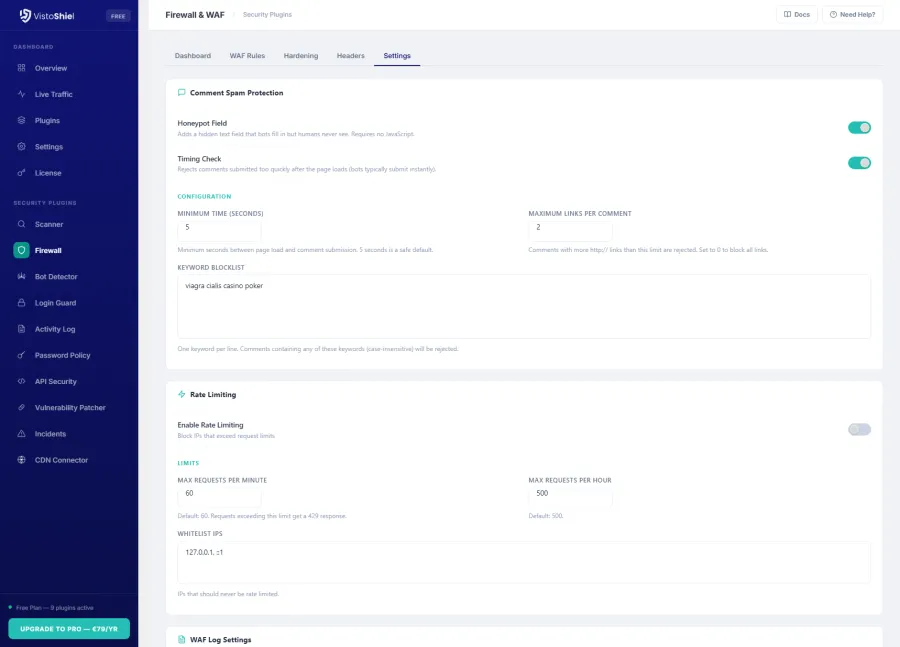
See It in Action
Explore the admin interface — click any screenshot to zoom
What This Solves
WordPress sites face constant attacks: SQL injection, cross-site scripting, file inclusion, and brute-force probes. Without a firewall, every request reaches your application layer unchecked. VistoShield Firewall blocks malicious requests before they execute, hardens your WordPress configuration, and adds security headers that browsers enforce.
Unlike cloud WAFs that proxy all your traffic through third-party servers, VistoShield's firewall runs directly on your server — giving you WordPress-aware protection without DNS changes, traffic delays, or sharing visitor data with intermediaries. Your traffic stays between your visitors and your server.
Who This Module Is For
Site Owners Worried About Injections
SQL injection and XSS are the top two attack vectors on WordPress. The WAF blocks both at the application layer so you can sleep at night knowing your content and database are protected.
WooCommerce Sites Handling Payments
Payment pages are high-value targets. A web application firewall adds a critical layer of defense between your checkout flow and the attackers trying to exploit it.
Developers Who Want Hardening Without Server Access
No SSH required. The 14-point hardening checklist and HTTP security headers are applied at the PHP level, so you get server-grade protection on any shared or managed host.
Key Features
WAF Rules
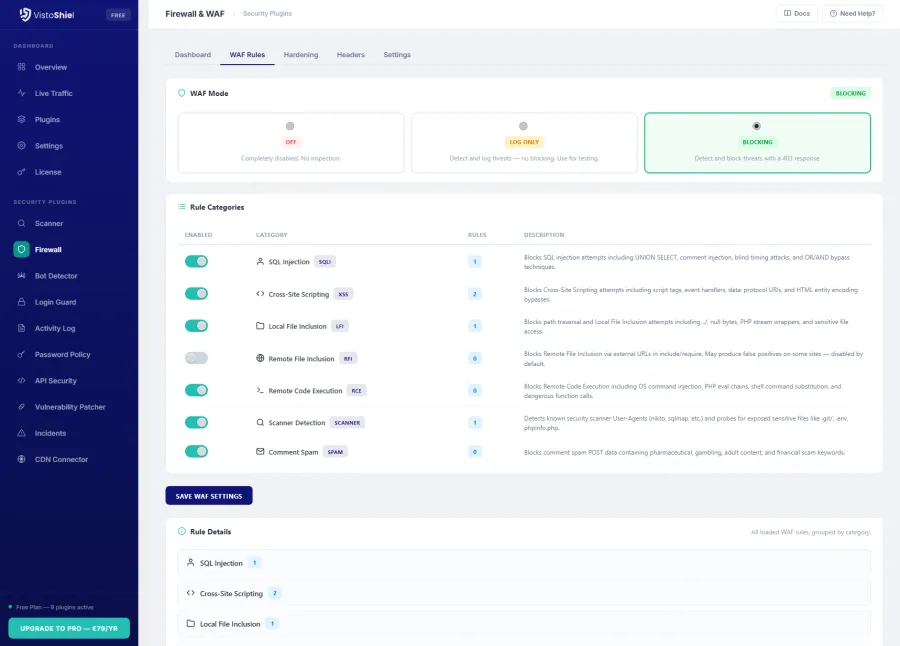
7 rule categories covering SQL injection, cross-site scripting (XSS), local file inclusion (LFI), remote file inclusion (RFI), remote code execution (RCE), scanner detection, and comment spam.
Learning Mode
Enable learning mode to detect and log threats without blocking any requests. Review what the WAF would have blocked before switching to active protection.
Security Hardening
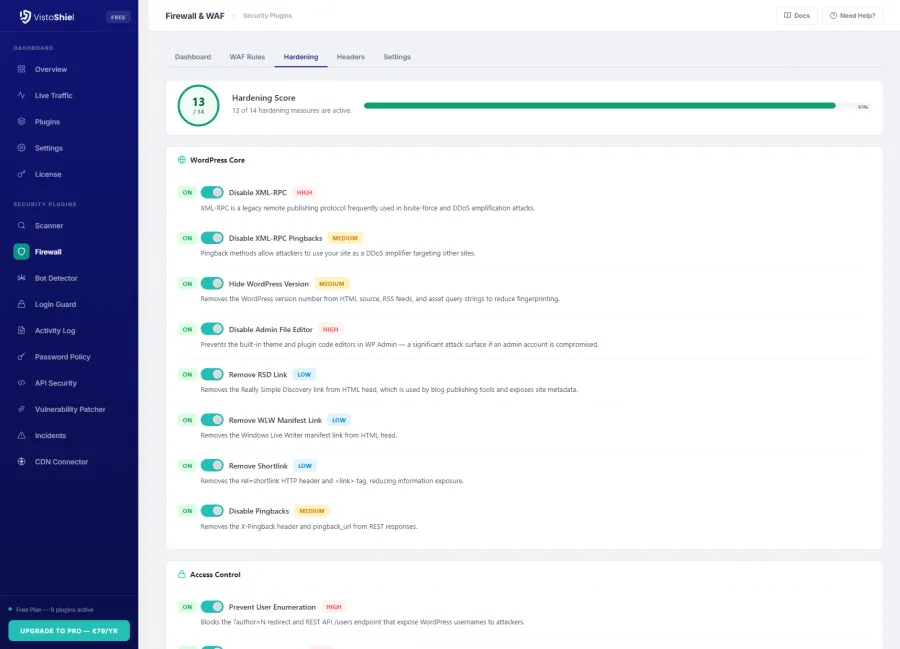
14-point hardening checklist including disable XML-RPC, hide WordPress version, block author enumeration, disable file editing, and restrict REST API access.
HTTP Security Headers
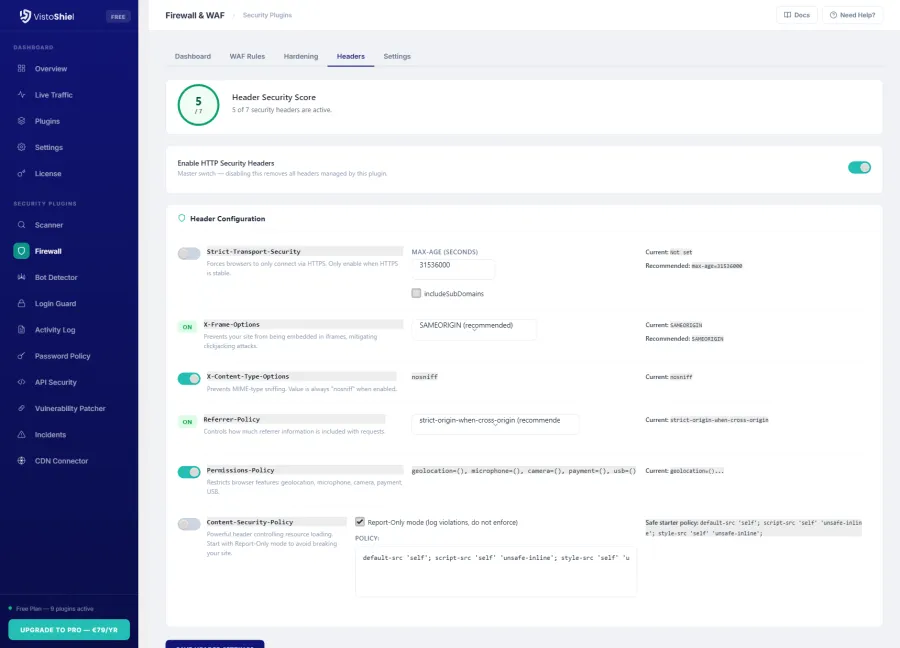
Configure HSTS, X-Frame-Options, Content-Security-Policy, X-Content-Type-Options, Referrer-Policy, Permissions-Policy, and Cross-Origin headers from one interface.
Event Logging
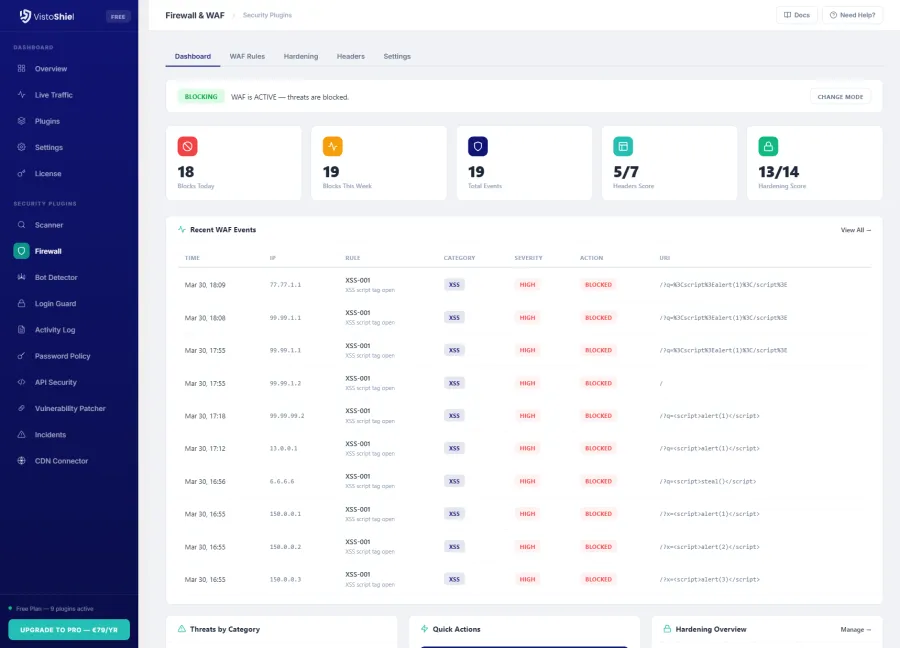
Detailed WAF event log showing every blocked or flagged request with severity level, matched rule, request URI, IP address, and timestamp.
Country Blocking Pro
Block or allow entire countries from accessing your site based on IP geolocation. Choose block mode (deny listed countries) or allow mode (permit only listed countries). A feature previously only available in Wordfence Premium.
Server Integration
Syncs blocked IPs with the cloud dashboard. Optional: integrates with VistoShield Server Edition for kernel-level blocking via nftables/iptables.
WAF Modes & Rule Categories
The Web Application Firewall operates in three modes: Disabled, Learning, and Active. Learning mode is the recommended starting point — it logs every rule match without blocking traffic, letting you identify false positives before enabling enforcement.
7 Rule Categories
- SQL Injection (SQLi) — blocks union-based, error-based, and blind injection attempts in query strings, POST data, and cookies
- Cross-Site Scripting (XSS) — filters inline scripts, event handlers, and encoded payloads in user input
- Local File Inclusion (LFI) — prevents path traversal attacks targeting
/etc/passwd,wp-config.php, and similar files - Remote File Inclusion (RFI) — blocks attempts to include external PHP files via URL parameters
- Remote Code Execution (RCE) — detects command injection attempts using
system(),exec(),passthru() - Scanner Detection — identifies automated vulnerability scanners by their request patterns and user agents
- Comment Spam — blocks spam bots targeting
wp-comments-post.phpwithout proper referrer headers
14-Point Hardening Checklist
- Disable XML-RPC completely
- Hide WordPress version from source
- Block author enumeration (
?author=N) - Disable file editing in admin
- Restrict REST API to authenticated users
- Remove Windows Live Writer manifest
- Remove RSD/EditURI link
- Disable RSS/Atom feeds (optional)
- Block PHP execution in uploads directory
- Protect
wp-config.phpaccess - Disable directory browsing
- Remove version query strings from assets
- Block access to sensitive files (
.htaccess,readme.html) - Force secure cookies on HTTPS sites
HTTP Security Headers
Security headers are the first line of defense against browser-based attacks. The Firewall plugin lets you configure all major security headers from a single settings page, with sensible defaults and the ability to customize each directive.
Headers are applied at the PHP level, so they work on any hosting environment without requiring access to server configuration files. Each header includes a description of what it does and recommended values for WordPress sites.
Why Upgrade Firewall to Pro
Free gives you real-time WAF protection. Pro adds long-term attack visibility — see which attack patterns target your site over weeks and months, not just the last 3 days. Automated PDF reports document your security posture for stakeholders or clients. Priority support means faster help when you need to fine-tune rules for a complex site. See this data in your cloud dashboard — alongside all your other sites.
Free vs Pro vs Max
Keep full WAF protection for free. Pro adds long-term attack visibility, automated reporting, and priority support for business-critical sites.
| Feature | Free | Pro | Max |
|---|---|---|---|
| WAF rules (7 categories) | ✓ | ✓ | ✓ |
| Security hardening | ✓ 14-point | ✓ 14-point | ✓ 14-point |
| HTTP security headers | ✓ | ✓ | ✓ |
| Country / Geo blocking | ✗ | ✓ | ✓ |
| WAF event history | 3 days | 14 days | 30 days |
| PDF security reports | ✗ | ✓ Standard | ✓ White-label |
| Team members | 1 | 5 | 20 |
| White-label branding | ✗ | ✗ | ✓ |
| API access | ✗ | ✗ | ✓ |
| Notifications | Email + Slack + webhook | Email + Slack + webhook + SMS | |
| Support | Community | 48h email | Priority email (24h) |
| $0 forever | $89/yr $7.42/mo billed annually $9.90/mo billed monthly | $169/yr $14.08/mo billed annually $18.90/mo billed monthly | |
| Start for Free No credit card required | Start Free Trial No credit card required | Start Free Trial No credit card required |
This is just 1 of 14 security modules. Every plan includes all modules — firewall, scanner, bot detection, uptime monitoring, and more. See full plan comparison →
Why an Endpoint Firewall?
Cloud WAFs route all your traffic through third-party servers, requiring DNS changes and adding latency. VistoShield's endpoint approach means:
- No DNS changes required — install and activate, no configuration at the DNS level
- No traffic proxying — visitor data never passes through third-party servers
- WordPress-aware rules — the WAF understands WordPress hooks, plugins, and themes at the application level
- Zero added latency — no extra network hop between your visitors and your server
- Privacy by design — visitor IP addresses, cookies, and request data stay on your server
Ready to Protect Your WordPress Site?
Install Firewall & WAF from the WordPress plugin directory and enable protection in minutes.
Get Started Free See All Plans →14-day free trial • 30-day money-back guarantee